



Dickson Support Database
Get Started With Locations and General Structure
About Getting Started With Locations and General Structure #
- Locations can help users organize devices in a manner that is fitting to their specific account (i.e., by geographical location and/or application)
- Sketch out a general structure beforehand to consider how detailed it will be
- User permissions are also managed by the locations a user may have access to
- Various structures can be created to allow flexibility and achieve your needs
How to Get Started With Locations and General Structure #
Basic Example: #
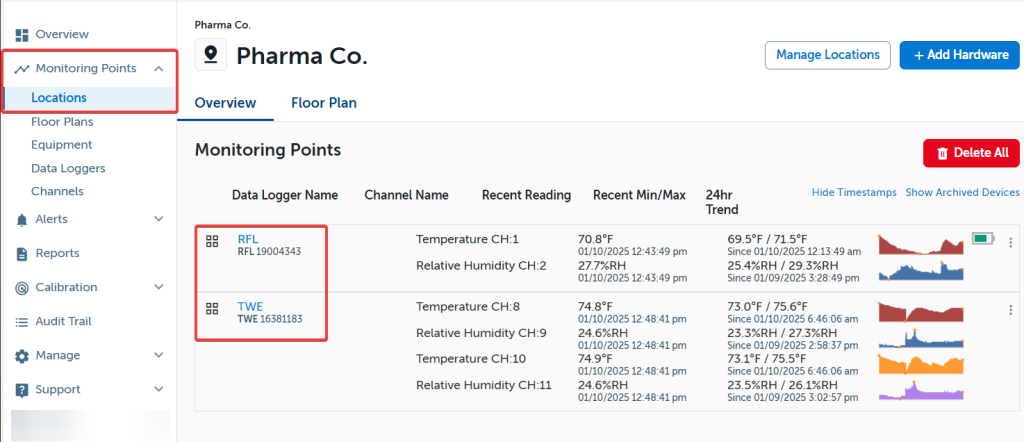
The Primary Location (The Company Name in the Account Settings) with Devices Below it. Both Devices are at Pharma Co.
Pharma Co.
One Building with Multiple Locations: #
Single Building with Multiple Locations. The Primary Location is Pharma Co. In Pharma Co. there are two main locations, West Wing and East Wing, with additional sub-locations West Wing Ambient and East Wing Ambient.

Note
Each location can have infinite devices in it, 1 or even zero for when you are ready to add devices. We recommend adding a location for archived devices, should a device ever be replaced or removed from the account.
Multiple Locations with Multiple Facilities: #
Multiple Locations with Multiple Facilities may be used for a larger network.
Infinite locations can be created in DicksonOne. This can also mean that global locations can be added (e.g. European Region, North America Region, South West, East Coast).