



Dickson Support Database
Archive a Device
About Archiving a Device #
- Archiving a device will allow you to view the historical data and historical excursions that may have occurred without having to continue to collect samples of data.
- Archiving a device will remove the device from your subscription so that it is not charged for a reoccurring subscription or counted towards your subscription tier.
- Archiving a device can be paired with locations by creating a location for archived devices on the account.
Note:
Archiving a device is permanent and cannot be undone. Ensure that you no longer need the device for ongoing monitoring.
How to Archive a Device #
First Visit a Device to Archive It: #
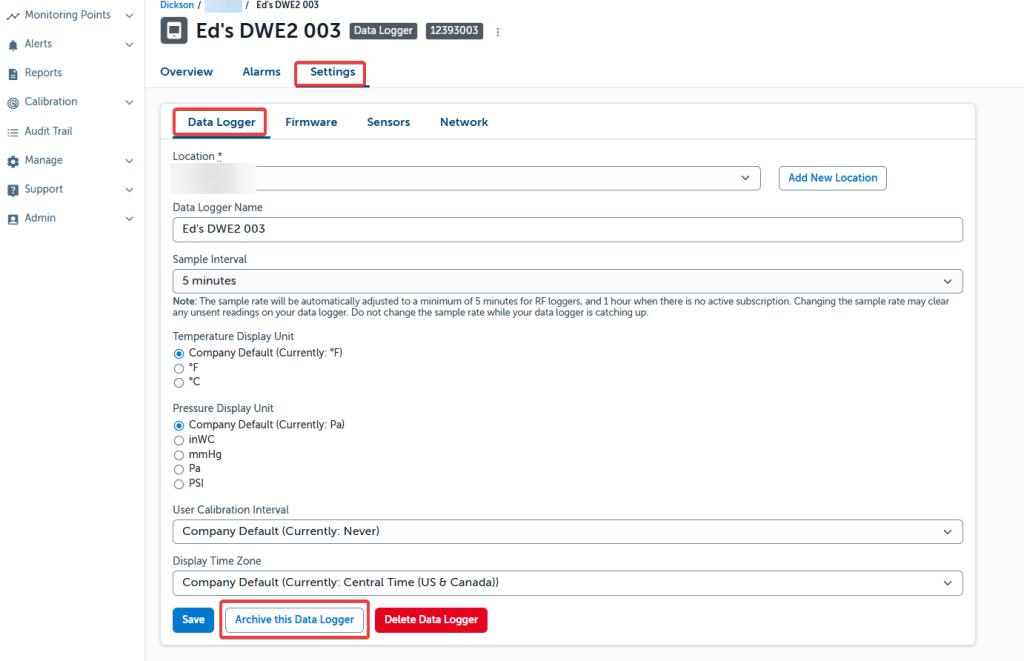
Visit a Device to Archive it.
- Click ‘Settings’ from the Device Overview Page when visiting a device
- Click ‘Archive this Device’ at the bottom of the Settings Page
Verify That You Want to Archive The Device: #
- Click ‘Archive’ after reviewing the Warning.

Warning
Archiving a Device
– Disables communication with the DicksonOne servers (device be be re-purposed).
– Will unapply any alarms to the device.
– Will remove the device from any future reports.
– Will remove the device from your account’s subscription plan
Where to Find The Archive Device: #
Viewing an Archived Device.
- When you visit a location, archived devices will have the message This device has been archived.
- An archived device is accessed the same way you access an active device.
- Click on the name of the device to view the historical data.

Remaining Access: #
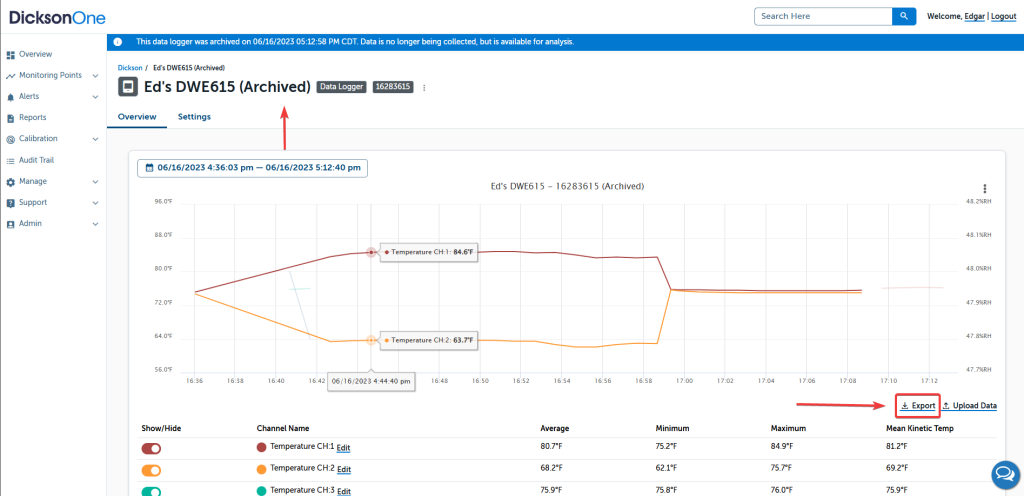
Archive Device Overview.
- The banner denotes the status of the Device.
- You can view a specific date range of data.
- View the channels you need only by using the On/Off toggle.
- Annotations for Excursions remain viewable.
- Exports can be created by clicking on the ‘Export’
Success!
You can now move forward to creating a location for Archived Devices. This can be a location on the main locations page or even a sub-location.
This article applies to these plans: #
- Basic
- Standard
- Professional
- Enterprise
This article applies to these plans: #
- Basic
- Standard
- Professional
- Enterprise