



Dickson Support Database
Edit a Report
About Editing a Report #
- Reports can be edited by copying the report into a new one so that changes as needed can be made to a future report
- Users can add or delete recipients on reports, select or remove devices, change the reporting data, and select a different frequency to send the reports
How to Edit a Report #
Editing Options: #
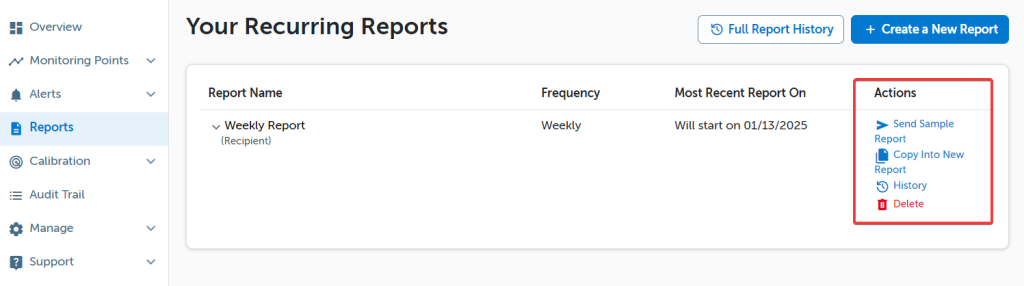
There are various actions that users can take under Actions
Note:
Copy Into New Report action allows a user to reuse the report and edit the report as desired (continue reading to learn more).
Copy Into New Report Action: #
This action will allow a user to replicate the existing report into a new copy of the report that can be edited
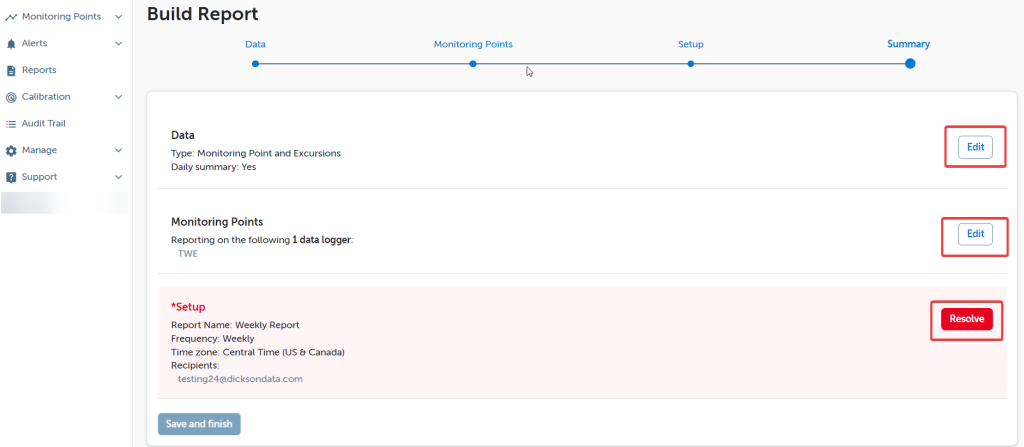
- Report Data (e.g. Device, Calibration, Tabular, etc.) can be edited by clicking Edit to the right
- Devices to report on (selected locations and or devices) can be edited by clicking Edit to the right
- Click Resolve to make changes to the title, frequency, and add or delete recipients of the report
- Click Save and finish when finished
If a report was Copied into a New Report, the old report can be deleted if you wish to no longer receive the previous report. Deleting a report will stop future reports from sending.
Reports that are automated can be edited for a variety of reasons. Take advantage of the automation the DicksonOne reporting suite has to offer.