



Dickson Support Database
Monitoring Points
About Monitoring Points #
- Users can navigate their monitoring points in various ways.
- The goal of Monitoring Points is to allow different views that bring attention to critical matters, and prioritize monitoring points based on criticality
- Monitoring Points by Locations used to be the DicksonOne Locations landing page, which now lives under ‘Monitoring Points.’
How to use Monitoring Points #
Monitoring Points > Locations #
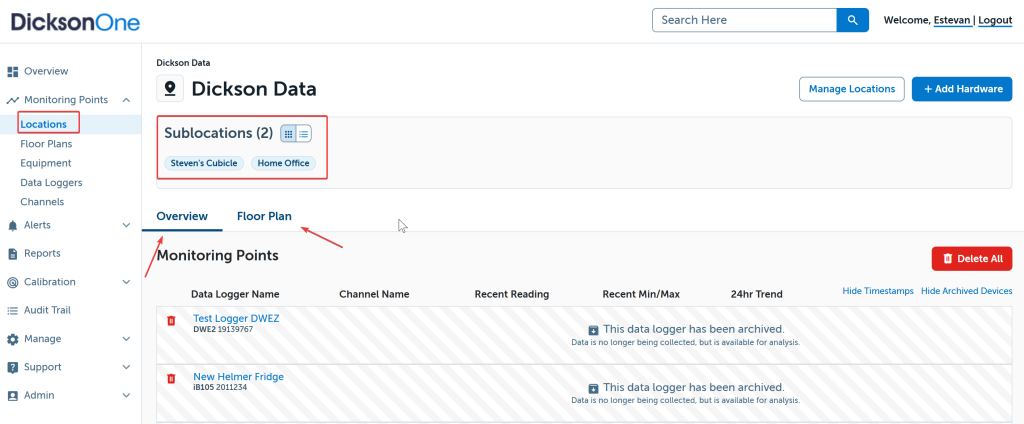
This is what the DicksonOne landing page used to look like once a user logged in.
- To arrive to the locations destination, click on Monitoring Points on the left-navigation bar and then click Locations
- You can continue to Register Devices from this page and can continue to organize your monitoring points through virtual locations
Monitoring Points > Data Loggers #
Devices with active Excursions and/or Warnings are prioritized to bring attention to critical matters.
- Click on settings and jump to the Overview, Alarms, or Settings pages
- Once you click into the Menu option, you can also create an Export
- Use the Search Devices bar to locate a specific device

Monitoring Points > Channels #
Channels with active Excursions and/or Warnings are prioritized to bring attention to critical matters. Channels can be a temperature probe that goes inside a refrigerator or a temperature channel that monitors the ambient temperature in a room.
- Click on settings and jump to the Overview, Alarms, or Settings pages
- Use the Search Devices bar to locate a specific device