



Smarter Thermal Mapping: Where Automation Meets Audit-Readiness
Thank you to everyone who joined us for our recent webinar, “Smarter Thermal Mapping: Where Automation Meets Audit-Readiness.” We had an incredible turnout and some great discussions—if you missed it or want to revisit key takeaways, we’ve got you covered.
Catch the complete session on demand to see how Dickson’s new Mapping Suite helps simplify and streamline validation workflows.
Watch the Full Webinar Recording
Highlights:
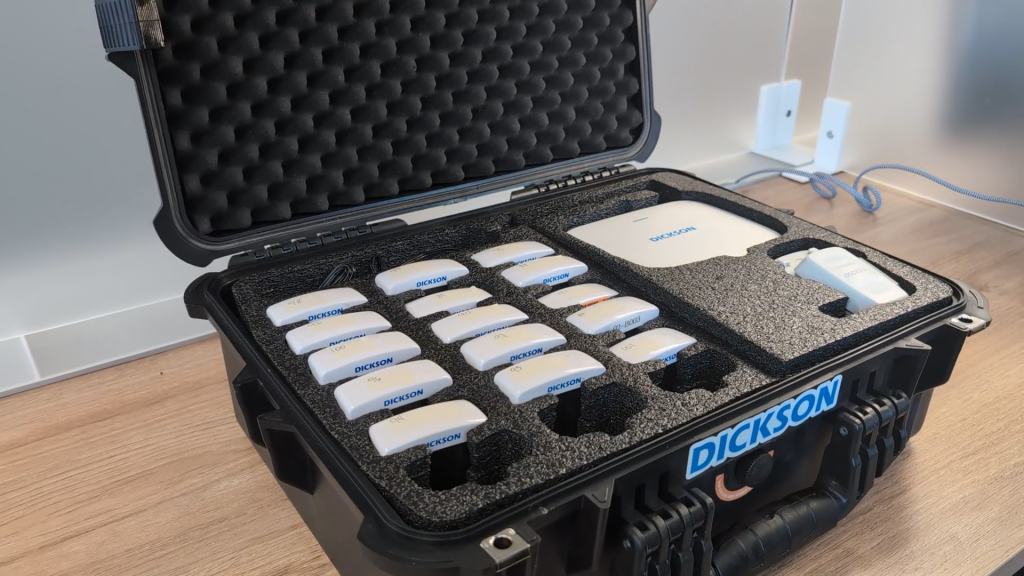
Pre-Configured Kits
Mapping Suite kits come pre-configured with calibrated sensors and a cellular-enabled gateway that operates independently of your IT infrastructure. The gateway arrives ready to use with a built-in 4G SIM card—no need for Wi-Fi or Ethernet (though both are available if preferred). All the user needs is login credentials to get started.

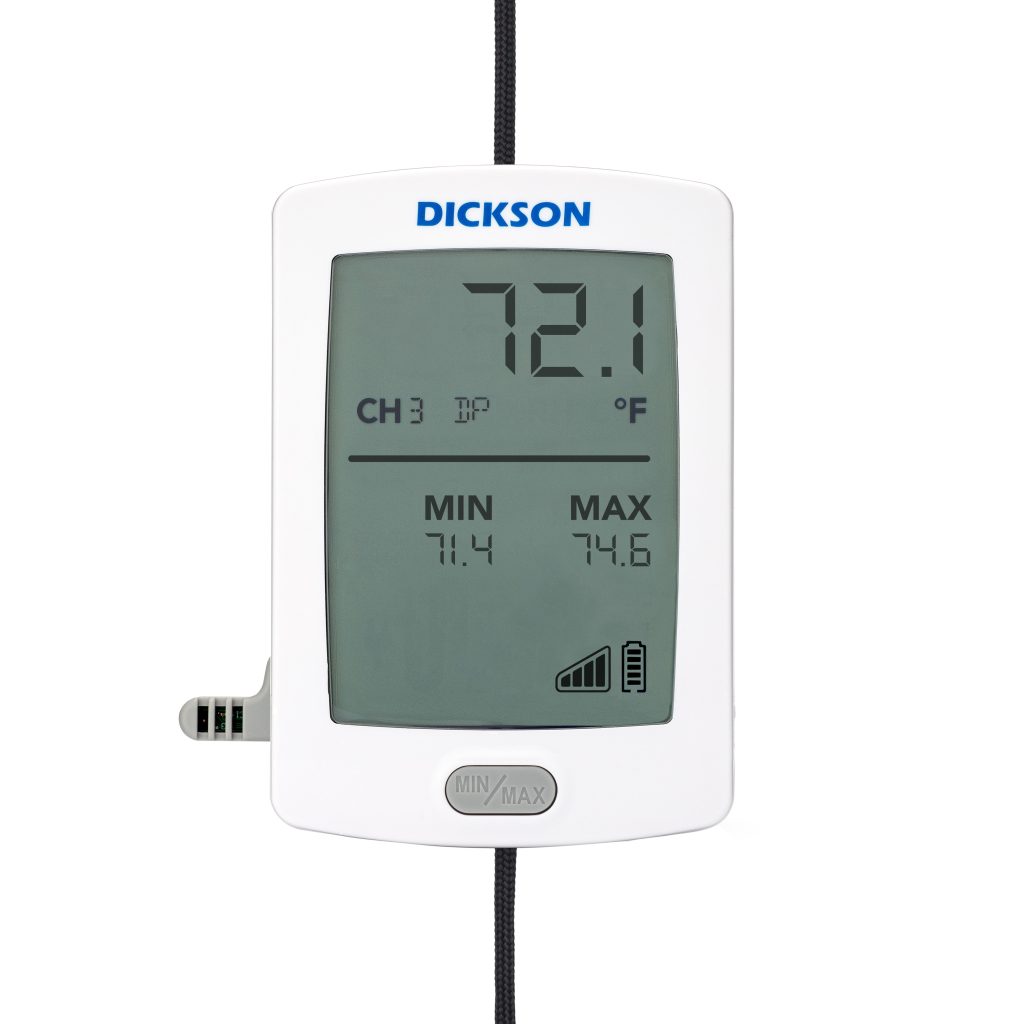
Unique Data Logger IDs
To reinforce traceability and accuracy, the RFL data loggers display unique IDs directly on their screen. During setup, these IDs correspond to pins on your floorplan schematic, ensuring precise placement and validation.
Optional Data Logger Ropes Available
Some mapping environments—especially walk-ins, warehouses, or production spaces—require sensors to be suspended rather than mounted. That’s where our optional hanging kits come in. Each kit includes a grabber and durable cord, allowing you to securely hang data loggers from ceilings, racks, or other structures.
Just Getting Started? Watch the 90-Second Overview
Want a quick look at how Mapping Suite works? This short video gives you a high-level walkthrough of how we’re helping teams automate mapping studies from start to finish.
Questions & Answers
We received a number of thoughtful questions during the webinar. Here’s the recap.
It depends on the space or equipment being mapped. Small equipment like refrigerators may need 9–15 sensors, while larger warehouses require sensor spacing based on WHO guidelines—typically every 30–90 feet horizontally and with vertical layering depending on storage height. The product’s risk profile also influences sensor density.
Refer to industry guidance such as ISPE and PDA for equipment mapping, and WHO for warehouse mapping. A risk-based approach should be used—higher risk products require denser sensor placement. Evaluate volume, configuration, and environment when planning sensor layout.
Use WHO guidelines to determine horizontal and vertical placement of sensors. Consider product sensitivity, ceiling height, airflow patterns, and operational zones. Also assess whether the whole warehouse or only parts of it require mapping.
Yes. Mapping Suite identifies hot and cold spots during a study. While it doesn’t currently automate location recommendations, the report allows users to make informed decisions on optimal permanent sensor placement.
Not automatically. However, all mapping reports are stored in the system and can be manually reviewed side-by-side to identify seasonal variations in environmental conditions.
No. Data logger IDs are tied to their serial numbers for traceability and compliance. Renaming or customizing logger IDs is not supported to maintain system integrity.
Yes. Users can view live data from each logger individually by clicking a pop-out window. This allows for proactive monitoring and quick response to anomalies.
If a logger fails or misses too many data points, it is automatically excluded from the final report to prevent data distortion. The system flags the excluded logger and documents the issue in the report.
No. At launch, calibration is handled exclusively by Dickson as part of the subscription model. Users cannot recalibrate sensors themselves.
Dickson manages all calibration. The software does not perform calibration functions. New calibrated sensors are shipped to users annually as part of the subscription. Calibration certificates are included with all sensors. If you’re returning sensors for annual recalibration, you may also request ‘as found’ data to document their condition prior to recalibration.
Sensors are part of a subscription model and are not owned by the user. They are provided as part of a kit, along with calibration and software access.
Mapping Suite is cloud-based and does not require an on-prem server. It can connect via Wi-Fi, Ethernet or the included SIM card for cellular connectivity. This provides flexibility for environments without stable Wi-Fi.
No. Since each kit includes a SIM card, the system can use cellular connectivity when Wi-Fi is not feasible, making it suitable for a wide variety of mobile or remote applications. The gateway is placed in a centralized location and connects to the loggers via LoRaWAN. Because LoRa is designed for long-range communication, signal strength is typically not impacted by walls or enclosures.
It doesn’t directly integrate with DicksonOne. However, it shares a similar user interface and cloud-based design principles for consistency. Mapping Suite is a standalone product.
Mapping Suite follows ISPE and PDA guidelines for uniformity. Manufacturer specifications should also be considered. Advanced calculations like MKT and standard deviation will be added in future updates.
Yes, Mapping Suite supports compliance with this regulation. Additional details can be provided upon request.
Not yet. Alarm functionality is being considered for future product updates but is not available at launch.
Zones can be defined as separate “spaces” within a study. Each space can have its own schematic, parameters, and logger deployment plan, allowing for detailed reporting per zone.
Sensors are recalibrated annually as part of the subscription. Recalibration after each study is at the discresion of the facility and SOP’s.
Web-based tools like Mapping Suite allow users to set up studies, view data, and generate reports from anywhere with internet access. No IT resources or local servers are needed.
Mapping Suite operates on a subscription model. Hardware, software access, calibration, and support are all included. Pricing is designed to be flexible and budget-friendly. To learn more, contact us at https://dicksondata.com/contact
Requirements vary by state. Some mandate annual mapping, others every two years. Most accredited facilities include periodic mapping in their SOPs. DDA recertification occurs every three years. While DDA outlines requirements for maintaining validated systems, it does not explicitly mandate re-mapping as part of the recertification process.
Standardize your SOPs and leverage the guardrails in Mapping Suite to create repeatable processes. Using the same tool across sites promotes consistency and scalability.
Still Have Questions?
We’d love to help you get started with Mapping Suite or explore whether it’s a fit for your process. Reach out to our team to schedule a quick chat.

Temperature Mapping, Simplified: Logger Placement & Compliance
How to Place Data Loggers for Mapping Studies and 3 Ways Dickson Can Help When it comes to temperature mapping, these two questions create the…

Modern Mapping and Validation Webinar Recap
Did you miss our recent “Audit Ready in Any Season: Modern Mapping & Validation” webinar, or want to revisit the highlights? We’ve got you covered….

Temperature Mapping: A Critical Process for Maintaining Compliance
In regulated industries, we often encounter materials and processes that are highly sensitive to temperature and humidity. The storage of certain pharmaceuticals is one example….

Why Is Temperature Mapping in Pharma Important?
A growing trend in the pharmaceutical industry is the development of more complex and fragile products, like biologicals, chemical mixtures, and large molecules (COVID-19 vaccines…
Ready to chat?
Talk To A Specialist
Our trained team of professionals is ready to help you through the compliance process from start to finish. Reach out today to start the conversation. Call (630) 563-4209 or send us a message.