


Why choose OCEAMap?
How OCEAMap works in 4 simple steps
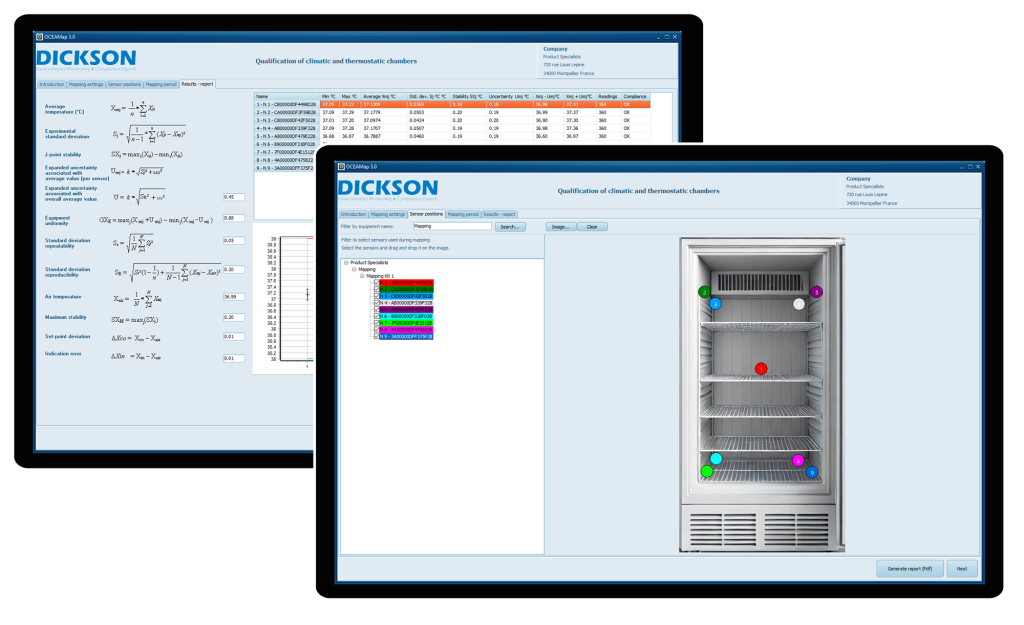
1
Configure your data loggers with OCEAView
Place the loggers in the unit you want to map and start collecting accurate data.
2
Add equipment details and methodologies
Enter your set point, position the loggers on an image, and add comments for optimal tracking.
3
Collect necessary data based on your equipment's volume
OCEAMap adheres to updated guidelines regarding the number of sensors required based on unit volume, as specified in the FD X 15-140 standard.
4
Generate a compliant and detailed report
With a single click, create a ready-to-use report, complete with exportable files for in-depth analysis.
Our OCEAMap Mapping Kits
We offer turnkey kits, including:
Need a custom setup?
Our kits can be personalized to meet your specific requirements.
Frequently Asked Questions (FAQ)
What types of equipment can I map with OCEAMap?
You can map any temperature-controlled unit: ovens, refrigerators, cold rooms, freezers, or laboratory storage areas.
Is OCEAMap compatible with existing systems?
Yes, OCEAMap works with all loggers connected to OCEAView, whether on cloud or on-premises.
Is FD X 15-140 compliance guaranteed?
Absolutely. All calculations and reports generated adhere to FD X 15-140 standards, ensuring complete compliance.
Can I extend data collection beyond 31 readings?
Yes, you can adjust the monitoring duration based on your needs for even more detailed analysis.
Do you still have questions?
Take action now
Simplify your temperature audits, ensure regulatory compliance, and optimize your processes with OCEAMap
Call us: +33 (0)4 99 13 67 30 | Email : co*****@*********ta.fr